2013年11月21日星期四

Calling ASP.NET Webservice (ASMX) from an Android Application, the Simplest Way

Introduction

There are several tutorials already present over the internet on this topic. But while going through some of these tutorials, I realized that either they are too complicated for a layman or are not explained properly. This is an important aspect of Android apps as it can easily be used to use existing business logic in Android rather than rewriting them. Another important aspect of this application is that you can easily use a global database to store the data that can be shared by different phones as against common practice of using in built SQLLite database for Android.

Using the Code

First let us look at a simple webservice.
<%@ WebService language="C#" class="MyLocal" %>
using System;
using System.Web.Services;
using System.Xml.Serialization;
public class MyLocal {
    [WebMethod]
    public int Add(int a, int b) {
        return a + b;
    } 
}
While creating this webservice, it asks for a namespace and here the namespace is www.tempura.org (pretty much the default namespace which I have not changed!). You can open this service fromhttp://grasshoppernetwork.com/NewFile.asmx.
When you open this webservice in browser, you can see a window like in the figure below:
Android-asmx/figure-1.png
I have marked it to show how to get the namespace name. It will also show the list of methods, which you cannot test. So how to know the arguments and return type? Click on the method and see the figure below:
Android-asmx/Figure2-soap_structure.png
Now you know what function you are calling, its arguments, return type and namespace (and of course URL).
For calling this method you need ksoap library, which you can download from here.
Copy the downloaded zip file in any appropriate location. This is an external jar file which you need to include in your Android project.
Start an Android project and select Android API. Right click on the project node in the workspace, properties->java build path->libraries->Add external jar.
Browse and select your ksoap jar file.
All we have to do now is to write a method which can call the web service and return the result. Remember that Android gives you an exception if you try any socket operation from main activity thread. Therefore it is better to write a separate class and isolate soap related functions.
Let us now understand the logic of this class.
package my.MySOAPCallActivity.namespace; 
import org.ksoap2.SoapEnvelope; 
import org.ksoap2.serialization.PropertyInfo; 
import org.ksoap2.serialization.SoapObject;
import org.ksoap2.serialization.SoapSerializationEnvelope;
import org.ksoap2.transport.HttpTransportSE;
public class CallSoap 
{
public final String SOAP_ACTION = "http://tempuri.org/Add";

public  final String OPERATION_NAME = "Add"; 

public  final String WSDL_TARGET_NAMESPACE = "http://tempuri.org/";

public  final String SOAP_ADDRESS = "http://grasshoppernetwork.com/NewFile.asmx";
public CallSoap() 
{ 
}
public String Call(int a,int b)
{
SoapObject request = new SoapObject(WSDL_TARGET_NAMESPACE,OPERATION_NAME);
PropertyInfo pi=new PropertyInfo();
pi.setName("a");
        pi.setValue(a);
        pi.setType(Integer.class);
        request.addProperty(pi);
        pi=new PropertyInfo();
        pi.setName("b");
        pi.setValue(b);
        pi.setType(Integer.class);
        request.addProperty(pi);

SoapSerializationEnvelope envelope = new SoapSerializationEnvelope(
SoapEnvelope.VER11);
envelope.dotNet = true;

envelope.setOutputSoapObject(request);

HttpTransportSE httpTransport = new HttpTransportSE(SOAP_ADDRESS);
Object response=null;
try
{
httpTransport.call(SOAP_ACTION, envelope);
response = envelope.getResponse();
}
catch (Exception exception)
{
response=exception.toString();
}
return response.toString();
}
}
  • First SOAP_ACTION = namespace as seen in figure 1+function name;
  • OPERATION_NAME = name of the web method;
  • WSDL_TARGET_NAMESPACE = namespace of the webservice;
  • SOAP_ADDRESS = absolute URL of the webservice;
SOAP works on request response pair. So first you need to build a request object which can call the web service.
SoapObject request = new SoapObject(WSDL_TARGET_NAMESPACE,OPERATION_NAME);
Now the operation or the method that you intend to call has some arguments which you need to attach to the request object. This is done through PropertyInfo Instance pi. The important thing to notice here is that the name that you use in setName() method must be the exact name of the property that you have seen in the figure above and in setType(), the data type of the variable must be specified. UsingaddProperty(), add all the arguments.
Using setValue() method, set the value to the property.
PropertyInfo pi=new PropertyInfo(); 
pi.setName("a"); 
pi.setValue(a); 
pi.setType(Integer.class); 
request.addProperty(pi);
Create a serialized envelope which will be used to carry the parameters for SOAP body and call the method through HttpTransportSE method.
Now you are very much ready with techniques for calling web method and getting the result. For simplicity, we have made a simple Android GUI with two EditText and one Button.
See the main.xml code as below:
<?xml version="1.0" encoding="utf-8"?>
<LinearLayout xmlns:android="http://schemas.android.com/apk/res/android"
    android:orientation="vertical"
    android:layout_width="fill_parent"
    android:layout_height="fill_parent"
    >
<TextView  
    android:layout_width="fill_parent" 
    android:layout_height="wrap_content" 
    android:text="@string/hello"
    />
<EditText 
        android:id="@+id/editText1"
    android:layout_width="230dp"
    android:layout_height="wrap_content" >
    <requestFocus />
</EditText> 
<EditText
    android:id="@+id/editText2"
    android:layout_width="232dp"
    android:layout_height="wrap_content" />
<Button
    android:id="@+id/button1"
    android:layout_width="229dp"
    android:layout_height="wrap_content"
    android:text="@string/btnStr" />
</LinearLayout>
We want to call the method from button click event from activity class.
See the code below:
package my.MySOAPCallActivity.namespace;
import android.app.Activity;
import android.app.AlertDialog;
import android.os.Bundle;
import android.view.View;
import android.view.View.OnClickListener;
import android.widget.Button;
import android.widget.EditText;
public class SimpleAsmxSOAPCallActivity extends Activity {
    /** Called when the activity is first created. */
    @Override
    public void onCreate(Bundle savedInstanceState) {
        super.onCreate(savedInstanceState);
        setContentView(R.layout.main);
        Button b1=(Button)findViewById(R.id.button1);
       final  AlertDialog ad=new AlertDialog.Builder(this).create();
         
        b1.setOnClickListener(new OnClickListener() { 
@Override
public void onClick(View arg0) {
// TODO Auto-generated method stub
CallSoap cs=new CallSoap();

try
{
EditText ed1=(EditText)findViewById(R.id.editText1);
EditText ed2=(EditText)findViewById(R.id.editText2);
int a=Integer.parseInt(ed1.getText().toString());
int b=Integer.parseInt(ed2.getText().toString());

ad.setTitle("OUTPUT OF ADD of "+a+" and "+b);

String resp=cs.Call(a, b);
ad.setMessage(resp);
}catch(Exception ex)
{
ad.setTitle("Error!");
ad.setMessage(ex.toString());
}
ad.show(); }
});
    }
}
All you do now is get the values for and from EditTexts and pass the values to call method. Call method returns the result of the web method.
String resp=cs.Call(a, b);
ad.setMessage(resp);
Once you get this up and running, you are very much likely to get an error likeandroid.os.NetworkOnMainThreadException.
That is because Android does not permit you to run socket related operations from main thread as we had already discussed. So you need to run a thread or create a thread from where you can perform these operations. You can easily model the CallSoap class as one implementing runnable and get the stuff. But I wanted to have the calling part as a separate entity. So I just made a separate thread class for calling theCallSoap method. It gives a nice layered implementation so that the thread that is calling the function where SOAP related activities are performed is completely different.
But now the problem is your activity thread and the network thread are in multi-thread operation and chances are your main thread ends before getting the result from the SOAP operation. So I used a primitive way of waiting for the result to arrive and then using it.
The caller class.
public class Caller  extends Thread  
{
    public CallSoap cs;
    public int a,b; 

    public void run(){
        try{
            cs=new CallSoap();
            String resp=cs.Call(a, b);
            MySOAPCallActivity.rslt=resp;
        }catch(Exception ex)
        {MySOAPCallActivity.rslt=ex.toString();}    
    }
}
Modified OnClick method of the button in activity thread which calls SOAP through this simple caller class.
package my.MySOAPCallActivity.namespace;
import android.app.Activity;
import android.os.Bundle;
import android.app.AlertDialog;
import android.view.View;
import android.view.View.OnClickListener;
import android.widget.Button;
import android.widget.EditText;

public class MySOAPCallActivity extends Activity {

public static String rslt="";    /** Called when the activity is first created. */
    @Override
    public void onCreate(Bundle savedInstanceState) {
        super.onCreate(savedInstanceState);
        setContentView(R.layout.main);
        Button b1=(Button)findViewById(R.id.button1);
        final  AlertDialog ad=new AlertDialog.Builder(this).create();

        b1.setOnClickListener(new OnClickListener() {
  
            @Override public void onClick(View arg0) {
            // TODO Auto-generated method stub 

            try
            { 
                EditText ed1=(EditText)findViewById(R.id.editText1);
                EditText ed2=(EditText)findViewById(R.id.editText2); 
                int a=Integer.parseInt(ed1.getText().toString());
                int b=Integer.parseInt(ed2.getText().toString());
                rslt="START"; 
                Caller c=new Caller(); c.a=a;
                c.b=b; c.ad=ad;
                c.join(); c.start();
                while(rslt=="START") {
                    try {
                        Thread.sleep(10); 
                    }catch(Exception ex) {
                    }
                }
                ad.setTitle("RESULT OF ADD of "+a+" and "+b);
                ad.setMessage(rslt); 
            }catch(Exception ex) {
                ad.setTitle("Error!"); ad.setMessage(ex.toString());
            }
            ad.show(); 
        } });
    }
}
Finally you get the results as shown below:
Android-asmx/fig_4.png

Points of Interest

Though returning a Complex class like Employee or Person or anything like that is not as simple as the technique explained here. They need to have another serializable class. But if you love simplicity, you can return the values of the properties of the class embedded in a single string like "Name#Age#Phone".
Where ‘#’ is a delimiter. Remember that DataReader is not serializable. So your web method must convertDataReader to string format and after receiving the result, you can separate the fields with simplestring splitting method.
You can download the complete code from:
Calling WebService from Android source code
Update: How to Run the Service locally 
As against my understanding that it can not be done, our friend Motaz has suggested a nice tips and workaround. Including it in main article so that anyone reads finds the answer quickly.
you just need to set the ip address of the service to 10.0.2.2 and the URL of the service would be :
http://10.0.2.2/service/WSGetCustomerCountryWise.asmx[^]
where 
service is your web service alias name in the IIS server
WSGetCustomerCountryWise is the name of the web service 

License

This article, along with any associated source code and files, is licensed under The Code Project Open License (CPOL)

2013年11月20日星期三

关于Android Studio加载第三方jar包无法编译的问题解决


Android Studio刚发布,相信很多朋友和我一样,开始尝试用其开发项目,但新东西总会遇到这样或那样的问题,其中最令我头的就是引入第三方的jar包无法编译的问题,因为是新东西,相关的信息都比较少,解决问题令我花费了相当长的时间,为了避免各位同仁再走弯路,在此将解决步骤列出来。

1、将jar包放入项目里的libs文件夹中。

2、在project选中jar包点击右键"Add as library"。

3、这两步是网上比较容易找到的,但此时项目仍然是无法正常编译的,会出现:

Gradle:
FAILURE: Build failed with an exception.

* What went wrong:
Execution failed for task ':ABetone:compileDebug'.
> Compilation failed; see the compiler error output for details.

* Try:
Run with --stacktrace option to get the stack trace. Run with --info or --debug option to get more log output.


Could not execute build using Gradle distribution 'http://services.gradle.org/distributions/gradle-1.6-bin.zip'.
  这时需要在项目的build.gradle文件里的dependencies节加入

dependencies {
    compile files('libs/android-support-v4.jar')
    compile files('libs/xxxx.jar')
}
4、此时项目正常编译并运行了,但当你的代码中真正创建了引用jar里的类实例时,有可能系统会抛出异常NoClassDefFoundError,这个时候可以按以下步骤操作:

进入命令提示符窗口。
定位到项目的根目录,即build.gradle所在的目录。
运行 "{android studio 安装目录}\sdk\tools\templates\gradle\wrapper\gradlew.bat" clean
重新编译运行项目
  通过以上操作,应该可以解决问题。PS:我的是Windows系统,Linux及Max系统gradlew命令的路径有可能不太一样。


希望以上能够帮助大家解决问题。

2013年11月19日星期二

C# 对象与JSON串互相转换

 转自:http://hi.baidu.com/lm_lemon/blog/item/af81e8ec08e532252cf534ba.html

DoNet2.0 需要借助于Newtonsoft.Json.dll

using System;
using System.IO;
using System.Text;
using Newtonsoft.Json;

namespace OfflineAcceptControl.UCTools
{
    public class JsonTools
    {
        // 从一个对象信息生成Json串
        public static string ObjectToJson(object obj)
        {
           return JavaScriptConvert.SerializeObject(obj);
        }
        // 从一个Json串生成对象信息
        public static object JsonToObject(string jsonString, object obj)
        {
           return JavaScriptConvert.DeserializeObject(jsonString, obj.GetType());
        }
    }
}


Donet3.5自带了DLL处理json串

注意引用:System.Runtime.Serialization,System.ServiceModel.Web


代码
using System;
using System.Collections.Generic;
using System.IO;
using System.Linq;
using System.Text;
using System.Runtime.Serialization;
using System.Runtime.Serialization.Json;

namespace CrjIIOfflineAccept.CrjIITools
{
    public class JsonTools
    {
        // 从一个对象信息生成Json串
        public static string ObjectToJson(object obj)
        {
           DataContractJsonSerializer serializer = new DataContractJsonSerializer(obj.GetType());
           MemoryStream stream = new MemoryStream();
           serializer.WriteObject(stream, obj);
           byte[] dataBytes = new byte[stream.Length];
           stream.Position = 0;
           stream.Read(dataBytes, 0, (int)stream.Length);
           return Encoding.UTF8.GetString(dataBytes);
        }
        // 从一个Json串生成对象信息
        public static object JsonToObject(string jsonString, object obj)
        {
           DataContractJsonSerializer serializer = new DataContractJsonSerializer(obj.GetType());
           MemoryStream mStream = new MemoryStream(Encoding.UTF8.GetBytes(jsonString));
           return serializer.ReadObject(mStream);
        }
    }
}

2013年11月18日星期一

乔恩 奥林格:纽约缔造的首位科技亿万富豪

对于这位纽约创造的首位科技界亿万富豪(确切地说,其个人净资产为13亿美元)来说,这样一个总部还是比较相称的。奥林格希望能借多屏幕上网、智能手机和宽带的东风将Shutterstock打造成全球最大的图片交易市场。在这个行业中,目前坐在头把交椅上的是凯雷投资集团(Carlyle Group)旗下的盖蒂图片社(Getty Images)。但近几个月来,39岁的奥林格与Facebook签订了合作协议,为后者的广告客户提供高品质照片素材。此外,Shutterstock还通过二次发行募集到了2.76亿美元资金。与此同时,他还对公司素材库进行扩充并进一步提升其平台的使用便利性。截至目前,Shutterstock的素材库内已存有2,500万张图片和100多万段视频,并可以通过20种语言进行搜索。十年前的Shutterstock,只有一部价值1,000美元的佳能Rebel相机和一间600平方英尺(约合56平方米——译注)的办公室,如今它已经迅速发展成了一个大型平台,每天有来自100多个国家的4万名内容贡献者上传2万张新图片。
“我们的发展越来越快。现在我们平均每秒卖出两张图片。”奥林格在现位于华尔街的Shutterstock办公室中接受采访时说道。他的公关负责人打断并更正道,是每秒卖出三张图片。“这是新公布的数字?太棒了。”奥林格笑道,“每秒卖出三张——我也刚刚得知。”
由于交易如此活跃,今年Shutterstock的营收照这样将达到2.3亿美元(据杰富瑞投行预测),较去年猛增35%。息税折旧及摊销前利润(Ebitda)应该会达到4,900万美元,较去年大涨39%。图库市场将成为一门价值60亿美元的大生意,而奥林格断言自己能从中分到10亿美元。“如果我还想做点别的,我就不会让公司上市了。”
对于在纽约顶级学区斯卡斯代尔长大并从小学起就开始编写代码的奥林格来说
,编程简直就是信手拈来。他很快就用自己的Apple II电脑为一些BBS网站制作了些小游戏和插件。“让电脑快速搞定一些人们原本要花很长时间才能做好的事,这总是很有意思。”
赚钱也是如此。当在长岛石溪大学攻读计算机科学和数学专业时,奥林格就开发出了最早的网站弹窗屏蔽软件之一,并且销量数以千计。1996年大学毕业后,他又到哥伦比亚大学继续攻读计算机科学硕士学位。“我没有很投入研究生的项目,”奥林格说道,“那时我在努力开发一些产品来补充完善弹窗拦截软件。既然有这么多人愿意为我掏腰包,我想我还能卖点别的东西给他们。”
他的确做到了,2002年时那些销售所得足以买下格拉梅西公园里一套价值45万美元的公寓。奥林格继续不断推出新产品并通过自己庞大的邮件列表进行推广,这些产品包括:个人防火墙、会计软件、cookie拦截软件以及商标管理器。他发现,附有照片的那些邮件往往比没有照片的效果更好,但他没有花钱购买昂贵的图片,而是买了一部佳能照相机自己动手拍摄。他很快意识到,其他网络创业者也可能会需要这些图片。于是,2003年他创建了一家网站,Shutterstock就这样诞生了。
第二年里他拍摄了3万张照片。“我会拍摄我所能找到的一切,比如一日三餐。我会拍摄我的朋友并让他们签字允许我发表,”他说道,“事实证明创建商业素材库真的一点也不难。”最终,他请了一位摄影总监来组织拍摄,并通过分类网站Craigslist以每天100美元的佣金找来了一些模特,拍摄开董事会的情形,或者在中央公园野餐的照片,或者让模特们利用报纸或一杯咖啡摆出各种拍摄造型。
每月只需缴纳49美元的订阅费,用户就能无限量下载图片。奥林格在谷歌(Google)网站上打广告,并亲自到处向创意人士推销自己的网站。该网站上的图片很快就供不应求,于是他又聘请一些内容贡献者来提升素材供应量。
微利图片库(microstock,即客户不想自己拍摄的低价非商标图片)的兴起彻底颠覆了图片销售行业。Shutterstock及其竞争对手iStockphoto都以1美元的低价出售那些要价曾经高达500美元的图片。2006年,当时尚未被凯雷收入囊中的盖蒂图片社最终以5,000万美元收购了iStockphoto。接着在2008年,盖蒂图片社自身实施了私有化退市,价格相当于其金融危机爆发前最高市值的六五折。“所有趋势都与乔恩的图片事业相吻合,只是乔恩比别人更早发现机会——他十年前就看出了端倪。”风险投资公司Insight Venture Partners的杰夫 利伯曼(Jeff Lieberman)说道,2007年时该公司投资了Shutterstock。

程序员必须知道的几个国外IT网站


最近有些读者给我来信说很喜欢这个网站上的文章,并且也想通过翻译学习英文,他们询问我这些文章的英文原文是从哪里找到的?
外刊IT评论上的翻译的英文来源很杂,我总结了一下,大概有几个集中的出处,下面列举出来供大家学习参考:
这是一个老牌的IT信息网站,从名称上你就能看出,它是关注服务器端编程的,以Java和Java周边信息为主,不过最近它也有向客户端和微软产品扩展的趋势。这个网站最初是以免费发放《Mastering Enterprise JavaBeans》这本电子书出名的,现在这本书已经更新到了ELB 3.0版,你现在仍然可以从网站上免费下载这本书。这个网站的内容包括IT新闻咨询,专家评论,专家访谈视频,会议视频等。
infoq上一个重点就是敏捷开发,内容很丰富,而且这个网站还提供中文版,但可能是翻译耗时的原因,中文内容总是比英文内容滞后几天。
3.Digg 的科技频道
Digg最初只是几个技术人员办的专门提供科技信息的网站,由于粉丝的不断增多,流量越来越大,网站的内容也扩展到非科技的各个方面,可糟糕的是,这导致了IT科技信息内容的质量不断下降,引起了很多元老级粉丝的不满,特别是去年这个网站的一次改版行动彻底的伤痛了粉丝的心,导致大批忠实粉丝撤离。网站的整个访问量几乎跌了一半。这是我眼睁睁的看到的一次由于改版而导致的灾难性事故的活生生的例子。
4.reddit 的编程和科技频道
reddit和Digg非常的相似,但界面看起来粗糙一些。最近这个网站的访问量大增,原因就是从Digg撤离的人都跑到这里来了。
Hacker News 是我最喜欢的一个网站,虽然它的界面在上面提到的这些网站中是最简陋的。Hacker News属于ycombinator.com旗下网站,ycombinator是一个给科技创业公司提供创业资金的公司,很多著名的IT公司都是从这里出来。Hacker News上的很多文章都是关于如何创业的。
如果你的英语阅读能力还可以,而且是搞编程的,我强烈推荐你经常到这些网站看看,一定会让你耳目一新。我不是崇洋媚外,但我坚决的认为国内的这些IT网站都烂的很,跟国内的软件业是同一个水平。蜀中无大将,那还是先看看别人的吧。
觉得文章有用?立即: 和朋友一起 共学习 共进步!
本文作者:
而且,对文章有任何想法,可: 正在拼命挖掘沟通路线,马上就通了!

2013年11月17日星期日

分清“语言/规范”以及“平台/实现”,以及跨平台.NET开发
都是CLI规范的具体实现),Java是运行在JRockit还是Hotspot(前者是Oracle的JVM商业实现,后者是Sun的开源实现――当然现在也是Oracle的),亦或是Android的Dalvik上?很显然,不同实现之间的表现会有区别,不可一概而论,否则也不会出现JavaScript引擎的效率之争了。同理,有些人使用Hotspot上的Java性能来说明Java在Android上运行时的表现,这也是不对的――要知道Google在和Oracle的Java专利官司中不断强调Dalvik不是“Oracle那种Java”。作为结论,Java在Android上的表现的确不错,但论证方式也必须正确才行。
当然,有时候“规范”也会影响到“实现”,例如一个动态分发的语言,其性能基本百分百不如在编译期绑定的静态语言。所以事情原本就是这么复杂,做一个思路清晰的程序员并不是件容易的事情。顺便一提,女人在这方面的头脑一般都比较清楚,她们一般都知道骑白马的不一定是王子,也有可能是唐僧。
对于俗称“.NET程序员”的那一批人来说,分清“语言”和“平台”更是一件十分重要的事情,因为C#语言可以说是目前“平台”、“实现”最为广泛的“语言”之一了。之前我为InfoQ写过一篇文章,其中提到Mono的创始人Miguel de Icaza给出的目前C#语言可执行平台的“不完全”列表,几乎覆盖了各种流行的操作系统及设备等等,例如: Windows Mac OS
Linux / BSD / Solaris
Windows Phone,Android,iOS
XBox 360,Wii,PS3 ……
因此就拿C#这一种语言来说,“实现”也会各自略有不同,这便是所谓的“配置(Profile)”。目前至少已经有这么多配置了:
.NET 4.0配置
Silverlight配置
Windows Phone 7配置
XBox360配置
Mono核心配置:与.NET配置相同,可以在Linux,MacOS X,Solaris,Windows和BSD里使用。
.NET Micro Framework
Mono的iOS配置
Mono的Android配置
Mono的PS3配置
Mono的Wii配置
Moonlight配置(与Silverlight兼容)
Moonlight扩展配置(Silverlight和完整的.NET 4 API)
“配置”之间的区别主要体现在执行环境的能力(例如iOS不支持运行时代码生成,因此支持AOT但不能JIT)以及类库的覆盖面上(例如XNA类库只存在于Windows Phone及XBox 360等游戏平台),不过它们终究实现了一个核心规范,因此我们可以说在不同平台上都可以“使用.NET进行开发”。
Mono实在是一个了不得的作品,它让我知道了“跨平台原来可以这么做”。之前我也写过有关跨平台的问题,其中谈到在“客户端的跨平台一般都很难得到最佳的体验”,这个论点的最佳证明便是Java。但Mono走的却是另一条跨平台的道路,它在各平台上实现了核心的执行引擎和类库之外,解决“体验”的方式便是在各个平台上提供原生平台的绑定。这样无论是在Mac OS,iOS,Android上都可以得到原生应用的体验。
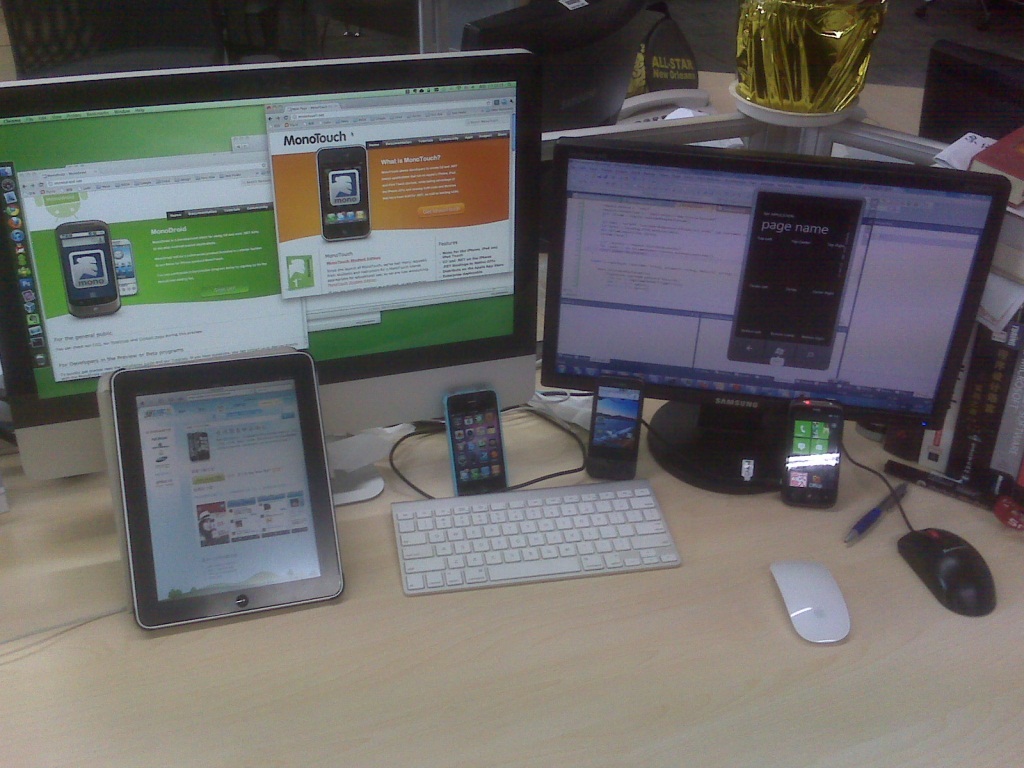
我很奇怪为什么有些搞.NET的人一边说.NET的适用面太小,一边却忽视Mono的成果,在我看来这完全是“自作孽不可活”,我愈发觉得是否接受Mono是判断一个.NET程序员是否优秀的重要准则。其实Mono实在很火,因为他为广大.NET程序员扩展了工作领域,使用现有的知识来开发iOS等平台的应用程序,还可以共享代码,何乐而不为?前不久苹果发布了Mac上的App Store,于是MonoMac也立即推出了面向AppStore的打包器Frank Krueger也开始着手移植它的作品iCircuit成果显著。因此在我看来,这才是一个现代.NET程序员该有的工作台:
loading

对于MonoTouch这样的新思路,带有疑惑是正常的。我也知道还有许多聪明人可以找到各种反对的理由。不管怎样,我现在这里随意列上几条吧:
有人说,用MonoTouch等.NET实现来做iOS开发“不正式”;我说,这个说法颇有“血统论”的意味,不过既然在Windows上用C++和Delphi都很正式,那么为什么在iOS上使用Objective-C才是正途?
有人说,MonoTouch性能一定不如Objective-C好;我说,这是猜测,即使性能不如Objective-C,看看各种案例也知道这在实践中并不是问题(事实上MonoTouch的前身便是Unity3D对Mono的使用,而iOS上实在有太多游戏在使用Unity3D了)。
有人说,MonoTouch或MonoDroid没有大公司支持,不靠谱;我说,您之前不是经常鄙视类似“开源没有微软靠谱”或是“微软开发人员只知道微软技术”这种说法的吗?
有人说,用MonoTouch等于抛弃了CocoaTouch社区,出了问题都没人问;我说,MonoTouch的问题基本就是CocoaTouch的问题,MonoTouch的UI层就是CocoaTouch,有问题直接去CocoaTouch社区或CocoaTouch程序员,代码直接映射,类库直接使用。
有人说,用MonoTouch的人不好招;我说,用C#、.NET的人比用Objective-C、Cocoa多太多了。给我一个熟练使用.NET和C#的人,三天上手,一周成为能够开发出成品的iOS开发者。
有人说,难道就是为了用.NET所以用MonoTouch?我说,用MonoTouch/MonoDroid的好处很多,例如我可以在iOS、Android、Windows Phone甚至更多平台上共享UI以外的代码,并可以直接使用大量.NET上的类库――这点实在太方便了。不要问我为什么Android上不能使用Java类库,我只知道开发Andorid的同事发现SOAP访问类库没有,REST找不到好的,JSON支持也只有最原始的支持,于是痛苦万分。
我还知道,这些说法依旧挡不住出现基于MonoDroid的DeltaEngine,这是个跨平台的游戏引擎,在Mono的支持下可以运行在Linux,MacOS X,iOS和Android上,在微软.NET支持下可以运行在XBox 360,Windows Phone 7自然还有普通的Windows系统上。在CES 2011上NVidia演示了一个游戏Soul Craft,它运行在LG Optimus 2X,这个游戏正是使用了DeltaEngine。
对于我们来说,最大的限制其实还是眼界和思维,突破这一屏障也是我组织nBazaar技术沙龙的目的之一。本周六将会举办第三届nBazaar技术交流会,具体信息请访问http://nbazaar.org/。如果您还没有报名,也可以直接前来,也欢迎带上感兴趣的朋友或同事。根据以往的经验,场地就像乳沟,挤挤总是有的……
觉得文章有用?立即: 和朋友一起 共学习 共进步!
本文作者:
而且,对文章有任何想法,可: 正在拼命挖掘沟通路线,马上就通了!

技术人必订阅的16个博客与介绍

作者根据自身经验,挑选出16个博客出来,并且为每个挑选出的博客,附上个人对其的简单介绍。一来算是对过去的一个归纳与总结,二来也可以帮助大家更好的挑选。
挑选的标准:
  1. 博客更新的频率;
  2. 博客中好文章的比率;
  3. 博客文章,对我的帮助;
  4. 以下挑选出来的博客,首先按照国际/国内划分,然后按照字母排序介绍;

1.ACM Queue (Architecting Tomorrow’s Computing)
作者:ACM。第一次认识ACM Queue,是因为一篇文章,Cary Millsap的Thinking Clearly about Performance。之后,就挖掘到了这个大宝藏,陆陆续续阅读了此博客上的大量文章,主要集中于Concurrency与Performance两个方面,受益匪浅。正如ACM Queue的副标题所言:Architecting Tomorrow’s Computing,这是一个值得持续关注的博客,每一篇文章,都是顶级论文水准的。

2.All Things Distributed
作者:Werner Vogels。如果一个世界顶级的互联网公司的CTO,还坚持写博客,坚持每周阅读各种各样技术论文。你会怎么看?不务正业,屌丝,这是一个不合格的CTO?Werner Vogels正是这样一个CTO,作为Amazon.com的CTO,Vogels仍旧坚持写博客,读论文,并且将其认为好的论文,通过Back-to-Basics Weekend Reading的方式,推荐给大家。Werner Vogels,颠覆了我对于CTO这个岗位的理解,Amazon.com在云计算领域能够取得今天的成功,绝非偶然。

3.Brendan’s blog
作者:Brendan Gregg。操作系统专家,DTrace技术专家,系统性能优化专家。关于他,多的自不必说,只需要提两点:1. Linux Performance Analysis and Tools,你应该看一遍;2. 他的新书:Systems Performance,值得阅读。

4.DimitriK’s (dim) Weblog
作者:Dimitri KRAVTCHUK。MySQL性能测试组成员,我心目中最欣赏的测试人员的模版。作为一个测试人员,开发自动化测试工具,对MySQL每一个版本进行性能测试,分析MySQL的性能瓶颈,熟知MySQL的整体架构与MySQL的源码。测试人员达到这种级别,对项目的巨大反哺作用,才得到了真正的体现。此外,DimitriK的每一篇博客,都写得非常好,从中学到了很多,无论是关于MySQL,还是关于测试。

5.Dr. Dobb’s (The World of Software Development)
作者:Dr. Dobb’s Journal。DDJ,号称软件领域的Oscar。DDJ上的技术文章,领域很多,可以挑选自己感兴趣的点进行关注,跟踪阅读。

6.High Scalability
作者:High Scalability。HS,不必说了,系统架构,最新技术… 技术人都应该订阅的博客。

7.Mechanical Sympathy
作者:Martin Thompson。程序设计方面,最喜欢的博客之一。他的每篇文章,都被我打上标签,可以反复阅读。就如此博客的副标题一样:Hardware and software working together in harmony。Martin追求的是软硬件和谐的系统,在他的博客中,这个理念也得到了贯彻,很多博文,都是关于CPU知识,Memory Model,高性能并发编程等。最后,按照jametong的理解,此博客的名字:Mechanical Sympathy,对应的中文意思应该是:庖丁解牛。

8.Paul E. McKenney’s Journal
作者:Paul E. McKenney。他最为人知的,是他是免费书perfbook的作者:Is Parallel Programming Hard, And, If So, What Can You Do About It?,是Linux RCU的作者。他不为人知的,他从90年底初期就开始进行并发程序设计,并且对Memory Model (CPU & C++ )有着极为深入的认识。除了他的博客,他写的相关技术文章,都值得一看:McKenney’s Selected Papers

9.Perspectives (James Hamilton’s Blog)
作者:James Hamilton。好吧,这个名字,值得关注。技术领域的高富帅。Hamilton最近博客关注的领域是硬件、数据中心,我个人不太懂。

10.preshing on programming
作者:Jeff Preshing。程序设计方面,最喜欢的博客之一。博客内容,主打的是Memory Model与并发编程,高性能编程。其关于Memory Model的一系列博文,环环相扣,将Memory Model的各个方面,做了详细的解释与分析,个人认为达到了出一本优质技术书的标准。

11.Transactions on InnoDB
作者:Oracle’s InnoDB Team
InnoDB团队维护的博客,披露了大量InnoDB引擎的实现细节。此博客的内容,主要有两方面:1. MySQL发布新版本时,会有大量关于新版本中改进技术的介绍;2. 最近,InnoDB团队开始逐渐披露InnoDB各模块的实现细节,包括:Redo、Transaction Lock、Row Format等。此博客,是学习InnoDB引擎的不二选择。

12.Wired Enterprise
作者:WIRED。WIRED杂志,博客更新频繁,关注最新技术与国际顶级公司。例如:量子计算机、比特币等。此外,我最喜欢的两篇文章:If Xerox PARC Invented the PC, Google Invented the InternetReturn of the Borg: How Twitter Rebuilt Google’s Secret Weapon,让我充分认识到了顶级公司、顶级牛人的实力,我辈仍需努力。

13.a db thinker’s home
作者,童家旺(@jametong),我在阿里B2B时的同事,国内我最佩服的技术人之一。我自觉还算比较努力,每年都会看很多书、论文与技术文章,但是jametong每年看的书比我至少还要多两倍以上。知识面相当广泛,他的博客,会定期更新他的Jame’s Reading,将其前段时间所看的资料做一个总结与归纳,所推荐的每一篇文章,都值得一看。

14.酷壳-CoolShell.cn (享受编程和技术所带来的快乐)
作者:陈皓。传说中的@左耳朵耗子,说真的,国内技术方面的好文章,不算多。但是酷壳上的文章,都能称之为好文章,国内技术人,必须订阅的博客。

15.刘未鹏|C++的罗浮宫
作者:刘未鹏。初识大刘的博客,是开始学习Memory Model (内存模型)时,搜到了他的一篇博客:《C++ 0x漫谈》系列之:多线程内存模型。想我在13年开始接触内存模型时,大刘早在07年已经把这个问题弄清楚了!从此文开始,我陆陆续续看了他博客中的其他文章,真心佩服。现在的遗憾是,大刘的博客,已经好久没更新了,精品也有看完的一天,希望能够重新拾掇起来。

16.系统技术非业余研究 (系统技术深度探索和应用)
作者:余锋。传说中的霸爷,@淘宝禇霸。霸爷对待技术的态度,当为我辈楷模,博客更新频繁,讨论的问题深入。霸爷的博客,主要涉及两个方面:1. 系统级的监控与优化;2. Erlang语言。就我个人来说,对于Erlang语言不熟,但是系统方面的博文,非常受用。例如:MySQL数据库网卡软中断不平衡问题及解决方案

无论怎样,跟踪博客、学习技术是一种态度,无论你在什么公司、位于何种职位、从事何种技术,学习前辈的先进方法,永远是一条最快的提升捷径。站在巨人的肩膀上,迎接世界的挑战。

作者@何_登成   来源:http://hedengcheng.com/?p=676